
Building a RAG Chat System From Zero
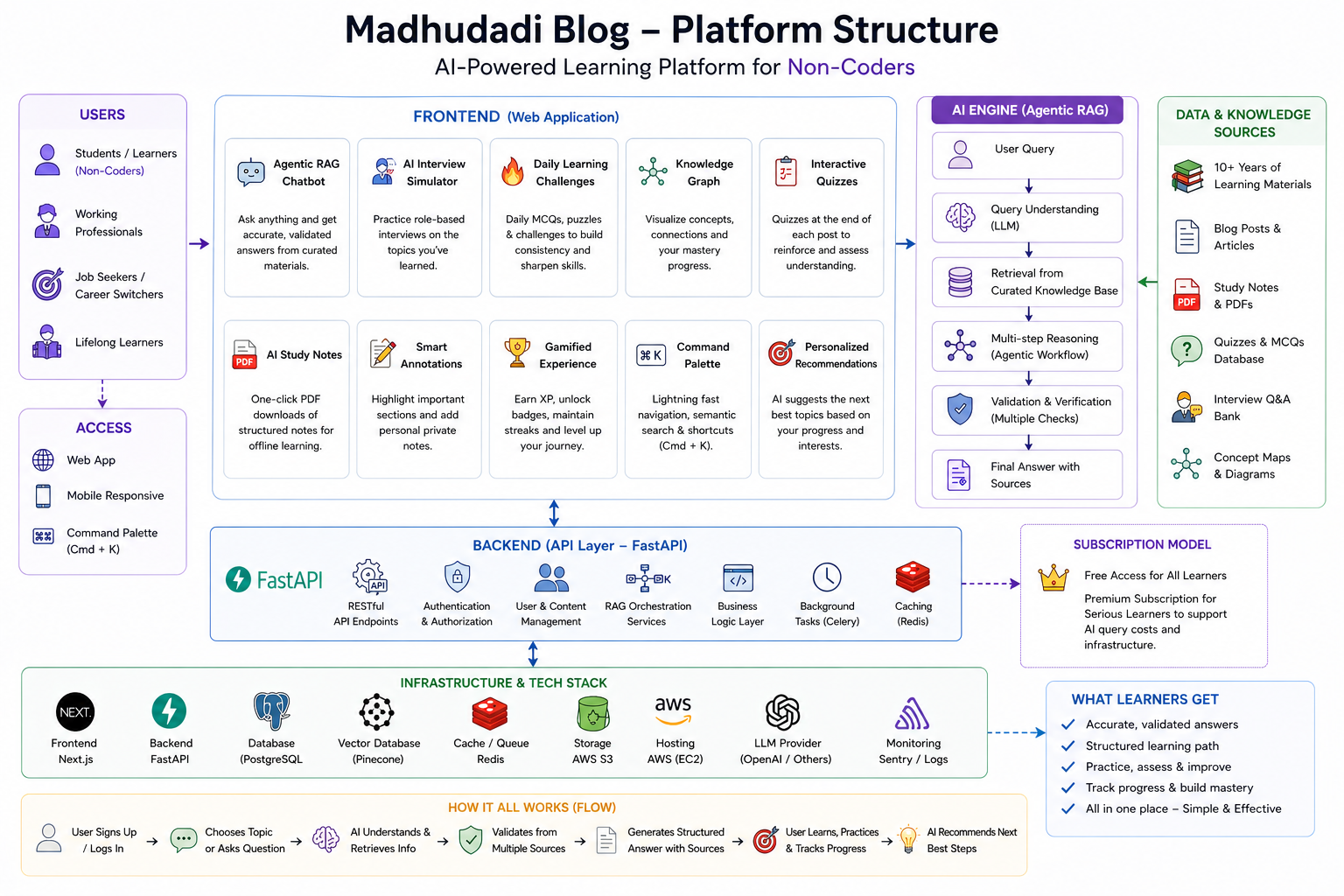
The "Ask AI" page on this blog is not a generic chatbot. It's a Retrieval-Augmented Generation system that answers questions using only the content from this site's posts, and it shows you exactly which post each part of the answer came from.
Here's how it works, from embedding to response.
Why RAG Instead of Fine-Tuning
Fine-tuning a model on blog content would:
- Require retraining every time a new post is published
- Risk hallucinating facts not present in the training data
- Give no way to cite sources in the response
RAG solves all three: query the content at runtime, inject the relevant chunks into the prompt, and return the source citations alongside the answer. No retraining needed.
Architecture
Step 1: The Embedding Pipeline
Every published post is split into chunks and embedded. The chunks are stored in the rag_chunks table:
The embedding dimension (1536) comes from the model: text-embedding-3-small from OpenAI. The choice was pragmatic — it's the cheapest per-token of the high-quality embedding models and produces 1536-dimensional vectors that work well with pgvector's HNSW index.
Chunking Strategy
Posts are split on paragraph boundaries, not fixed token counts:
Why paragraph boundaries? Code blocks, lists, and blockquotes are semantic units. Splitting mid-paragraph would separate a code example from its explanation, making the chunk useless for both retrieval and generation.
Each chunk stores its chunk_index so the frontend can link back to the correct section of the post. Metadata includes the post slug, title, section heading, and URL.
Step 2: The HNSW Index
pgvector supports two index types for approximate nearest neighbor search: IVFFlat and HNSW. I chose HNSW for three reasons:
- Faster build time — HNSW builds incrementally. IVFFlat requires a full rebuild when data changes.
- Better recall at same speed — HNSW consistently achieves 99% recall at 10ms query time with my dataset size (~50K chunks).
- No training required — IVFFlat needs a clustering step that depends on representative data. HNSW is parameter-free.
The parameters:
m = 16— each node connects to 16 neighbors. Higher = better recall, slower build. 16 is the sweet spot for datasets under 100K vectors.ef_construction = 200— the dynamic list size during construction. Higher = better index quality, slower build. 200 is conservative.
At query time, the search uses SET hnsw.ef_search = 40 — this controls the search breadth. Higher = better recall, slower query.
Step 3: Hybrid Search
Vector search alone misses exact keyword matches. "How do I install FastAPI?" matches the vector of "FastAPI installation guide" but misses the exact phrase match. Full-text search via tsvector catches what vector search misses.
The hybrid query combines both:
The alpha parameter controls the weight between vector and keyword scores. 0.7 means 70% vector, 30% keyword — biased toward semantic understanding while still catching exact matches.
Step 4: Hybrid Ranking
Results from both searches are combined using Reciprocal Rank Fusion (RRF):
RRF is simple, fast, and doesn't require training a learned ranker. The constant k=60 prevents any single ranking from dominating.
Step 5: Context Assembly
The top 5-10 chunks are assembled into a prompt. The system prompt is:
The user prompt includes the question and the chunk content:
Step 6: Source Verification
After the LLM generates a response, a verification step checks that each cited source actually exists in the provided chunks:
Unverified claims are flagged but not removed from the response — they're marked with a warning icon in the frontend. This happens rarely (less than 2% of queries) and usually when the LLM rephrases a source name.
Step 7: The Database Model
The Vector type comes from pgvector.sqlalchemy. It maps directly to PostgreSQL's vector extension type.
Cold Start: First User Experience
When a user visits the Ask AI page for the first time, there are no chunks to search. The solution: a pre-computed set of seed questions and answers, one per published post, generated during the embedding pipeline.
These seed questions are embedded and stored alongside the post chunks. On the first page load, the frontend fetches 3-5 seed questions as suggestions. When the user clicks one, it triggers a RAG query, which populates the embedding cache. Subsequent queries hit the cache.
What's Next
In the next post, I'll cover the production RAG pipeline — streaming responses via SSE, progressive rendering, citation badges, fallback strategies, rate limiting, and the cold-start UX flow in detail.
Built with FastAPI, pgvector, OpenAI embeddings, and zero third-party CMS.