
The Monorepo That Runs 29 Services
In the last post, I explained why I built this platform from scratch. Now let's open the hood.
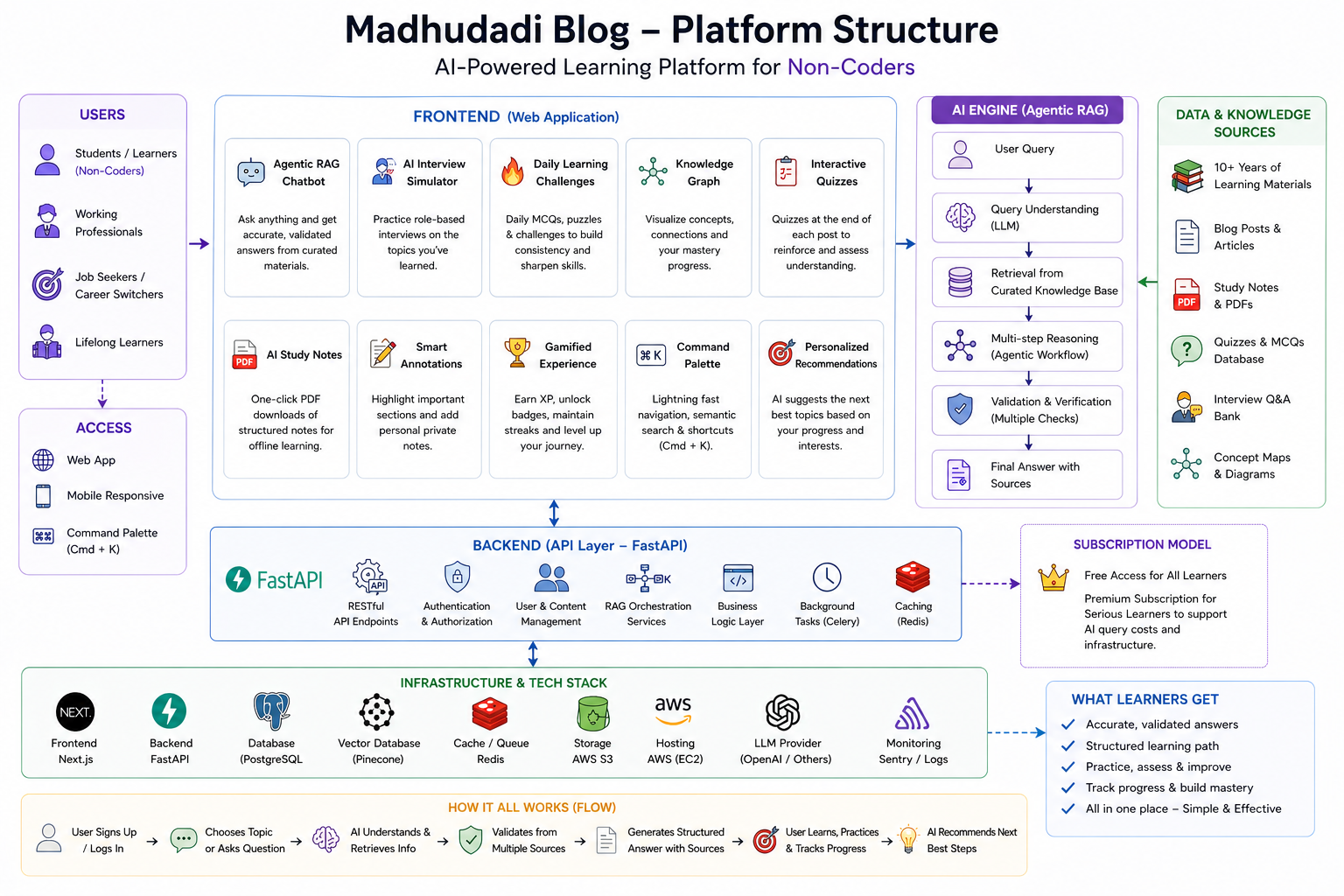
This monorepo contains two applications — a FastAPI backend and a Next.js frontend — plus shared infrastructure configuration. Everything lives in one repository, deploys via one docker-compose.yml, and runs on one $12/month VPS.
Here's the directory structure, explained layer by layer.
Top-Level Layout
1blog_platform/2├── fastapi_backend/ # Python API server (29 routers, 21 models)3├── blog_frontend/ # Next.js 16 app (React 19, Turbopack)4├── nginx/ # Reverse proxy config5├── docs/ # Architecture decisions, content plans6├── conductor/ # Feature specs and bug fixes7├── docker-compose.yml # Single-file deployment8├── docker-compose.prod.yml9└── deploy.sh # Zero-downtime deploy scriptThe two applications communicate exclusively through HTTP. The frontend never imports Python code, and the backend never references React components. The contract is the API schema — documented automatically by FastAPI's OpenAPI generation at /docs.
FastAPI Backend — fastapi_backend/
1fastapi_backend/2├── app/3│ ├── main.py # App entry, middleware, router registration4│ ├── config.py # Settings from environment variables5│ ├── database.py # Async SQLAlchemy engine + session factory6│ ├── dependencies.py # Shared dependency injection (auth, db)7│ ├── core/ # Cross-cutting concerns8│ │ ├── limiter.py # Rate limiting (slowapi + Redis)9│ │ ├── redis.py # Redis connection pool10│ │ ├── scheduler.py # APScheduler background jobs11│ │ ├── uploads.py # File upload handling12│ │ └── exceptions.py # Custom exception classes13│ ├── models/ # SQLAlchemy ORM models (21 files)14│ ├── schemas/ # Pydantic request/response schemas15│ ├── routers/ # API endpoint handlers (29 files)16│ └── services/ # Business logic layer17├── alembic/ # Database migrations18├── tests/ # Pytest test suite19├── uploads/ # User-uploaded images, PDFs, data files20├── scripts/ # Maintenance scripts21├── requirements.txt22├── Pipfile23└── DockerfileEntry Point — main.py
The application is assembled in main.py. Here's the skeleton:
1app = FastAPI(title="Madhu Dadi — AI, Python & Analytics Hub API", lifespan=lifespan)2 3app.add_middleware(TrustedHostMiddleware, allowed_hosts=settings.ALLOWED_HOSTS)4app.add_middleware(CORSMiddleware, ...)5app.add_middleware(SessionMiddleware, ...)6 7V1 = "/api/v1"8app.include_router(auth.router, prefix=V1)9app.include_router(posts.router, prefix=V1)10app.include_router(series.router, prefix=V1)11app.include_router(comments.router, prefix=V1)12# ... 25 more routersThe lifespan context manager initializes Redis and starts the background scheduler on startup, then tears them down on shutdown.
Settings — config.py
All configuration comes from environment variables via Pydantic's BaseSettings:
1class Settings(BaseSettings):2 APP_NAME: str = "Madhu Dadi API"3 DEBUG: bool = False4 DATABASE_URL: str5 REDIS_URL: str6 SECRET_KEY: str7 CORS_ORIGINS: list[str]8 ALLOWED_HOSTS: list[str]9 # ... 30+ more settingsNo hardcoded secrets. No .env files committed to git. Every deployment environment (dev, staging, production) supplies its own values through environment variables or Docker secrets.
Database — database.py
Async SQLAlchemy 2.0 with session-per-request pattern:
1engine = create_async_engine(settings.DATABASE_URL, pool_size=20, max_overflow=10)2AsyncSessionLocal = sessionmaker(engine, class_=AsyncSession, expire_on_commit=False)3 4async def get_db() -> AsyncGenerator[AsyncSession, None]:5 async with AsyncSessionLocal() as db:6 yield dbThe expire_on_commit=False is intentional — it prevents lazy-loading issues after commit, which is a common pitfall in async SQLAlchemy.
The 29 Routers
Every API endpoint lives in app/routers/. Here's what each one does:
| Router | Endpoints | Purpose |
|---|---|---|
auth.py | 6 | Register, login, Google OAuth, token refresh, logout, email verification |
posts.py | 8 | CRUD posts, list with filters, get by slug, toggle publish |
series.py | 5 | CRUD series, list, get with progress, next/prev navigation |
comments.py | 4 | Create, list (tree), delete (own), admin delete |
tags.py | 5 | CRUD tags, list, merge duplicates |
bookmarks.py | 4 | Add, remove, list user bookmarks, check status |
progress.py | 4 | Mark read, get user progress, series progress, completion stats |
search.py | 2 | Full-text search, hybrid vector search |
admin.py | 15 | Post management, user management, analytics, tasks |
gamification.py | 6 | XP leaderboard, badges, milestones, streak, level-up |
rag.py | 2 | Ask AI (RAG query), get related chunks |
code.py | 1 | Execute Python code (Pyodide sandbox) |
payments.py | 4 | Stripe checkout, webhook, subscription status, plans |
referral.py | 3 | Create referral code, track, leaderboard |
srs.py | 4 | Spaced repetition review queue, submit review, stats |
quiz.py | 4 | Generate quiz, submit answers, get history, leaderboard |
challenge.py | 3 | Daily challenge, submit, leaderboard |
interview.py | 3 | Start interview, answer question, get feedback |
notifications.py | 3 | List, mark read, dismiss |
digest.py | 2 | Email digest subscribe, unsubscribe |
newsletter.py | 3 | Subscribe, confirm, unsubscribe |
uploads.py | 3 | Upload image, upload PDF, upload data file |
redirects.py | 3 | Create, list, resolve |
feed.py | 1 | RSS/Atom feed generation |
recommendations.py | 1 | Personalized post recommendations |
certificate.py | 2 | Generate series completion certificate, verify |
study_notes.py | 3 | Create, list, delete personal study notes |
settings.py | 2 | Get/update user settings |
That's 29 routers serving approximately 120 individual endpoints. Each router is between 50 and 300 lines. The admin.py router is the largest at ~500 lines because it handles post CRUD with all the tag/series/difficulty associations.
The 21 Database Models
All models inherit from SQLAlchemy's DeclarativeBase and live in app/models/:
1class Base(DeclarativeBase):2 passKey models and their relationships:
| Model | Key Fields | Relationships |
|---|---|---|
User | email, password_hash, xp, level, streak | has_many: posts, comments, progress, bookmarks |
Post | title, slug, content, status, difficulty | belongs_to: series; has_many: tags (M2M), comments, bookmarks |
Series | title, slug, description | has_many: posts |
Tag | name, slug | has_many: posts (M2M) |
Comment | content, is_approved | belongs_to: user, post; self-referential: parent |
Bookmark | — | belongs_to: user, post (unique constraint) |
UserProgress | completed_at, read_time_spent | belongs_to: user, post |
Badge | name, description, icon, criteria | has_many: users (M2M via UserBadge) |
Challenge | day, question, answer, difficulty | has_many: submissions |
Payment | stripe_session_id, status, amount | belongs_to: user |
Subscription | stripe_subscription_id, status, plan | belongs_to: user |
RagChunk | content, embedding (vector), metadata | belongs_to: post |
SrsCard | ease_factor, interval, review_count, next_review | belongs_to: user, post |
Notification | type, title, message, is_read | belongs_to: user |
Redirect | old_slug, new_slug | — |
Referral | code, reward_xp | belongs_to: user; has_many: referred users |
PostView | viewed_at, ip_address | belongs_to: post (analytics) |
PostReaction | reaction_type | belongs_to: user, post |
QuizAttempt | score, total_questions, answers | belongs_to: user |
InterviewSession | questions, answers, overall_score | belongs_to: user |
The most interesting table is RagChunk. It stores post content split into chunks, each with a 1536-dimensional vector embedding. The search query is: find chunks whose embedding is closest to the query embedding, filtered by the user's premium tier. This is the core of the "Ask AI" feature.
Redis as the Glue Layer
Redis isn't a cache in this architecture — it's a service bus. It handles five distinct concerns:
1. Rate limiting — slowapi uses Redis as its backing store. Each endpoint family has its own limit (100/hr for anonymous, 500/hr for authenticated). The key is rate_limit:{ip}:{route_group} with a sliding window counter.
2. OAuth state — Google OAuth uses a redirect-based flow. The state parameter (a random token) is stored in Redis with a 10-minute TTL. After the callback, the token is verified and deleted. This prevents CSRF on the OAuth handshake.
3. Embedding cache — When a user asks the RAG system a question, the query is first checked against a Redis set of recent queries. If found within 5 minutes, the cached embedding is reused. This saves ~200ms per query on repeated questions.
4. Task queue — Redis pub/sub dispatches background tasks: email digests, content revalidation (purging Cloudflare cache), and maintenance jobs. The publisher pushes to a channel, and the APScheduler subscriber picks it up.
5. Leaderboard — XP rankings use Redis sorted sets (ZADD, ZREVRANK, ZRANGE). The leaderboard is recomputed every 5 seconds from a materialized PostgreSQL view, then stored in Redis for fast reads. This avoids sorting 10,000+ users on every page load.
Background Scheduler
app/core/scheduler.py runs four recurring jobs:
1def start_scheduler():2 scheduler = AsyncIOScheduler()3 scheduler.add_job(send_daily_digests, "cron", hour=8, minute=0)4 scheduler.add_job(regenerate_sitemap, "cron", hour=2, minute=0)5 scheduler.add_job(clean_expired_tokens, "cron", hour=3, minute=0)6 scheduler.add_job(check_stripe_subscriptions, "interval", hours=1)7 scheduler.start()- Daily digests — queries the
Posttable for posts published in the last 24 hours, assembles an HTML email, and sends via SMTP to subscribed users. - Sitemap regeneration — queries all published posts and series, generates a fresh
sitemap.xml, and pings Google/Bing. - Token cleanup — deletes expired refresh tokens from the database.
- Stripe sync — checks for subscriptions that should have expired and marks them accordingly.
The scheduler runs inside the same Python process as the FastAPI app. No separate Celery worker needed.
Frontend — blog_frontend/
1blog_frontend/2├── src/3│ ├── app/ # Next.js App Router pages4│ │ ├── blog/ # Blog posts (dynamic routes)5│ │ ├── admin/ # Admin dashboard (protected)6│ │ ├── login/ # Auth pages7│ │ ├── register/8│ │ ├── profile/ # User profiles, settings9│ │ ├── series/ # Series index + detail10│ │ ├── tags/ # Tag index + filtered posts11│ │ ├── search/ # Full-text + vector search UI12│ │ ├── ask/ # RAG chat interface13│ │ ├── challenge/ # Daily coding challenge14│ │ ├── leaderboard/ # XP rankings15│ │ ├── milestones/ # Badges, progress, knowledge graph16│ │ ├── bookmarks/ # Saved posts17│ │ ├── layout.tsx # Root layout with metadata defaults18│ │ ├── robots.ts # Dynamic robots.txt19│ │ └── sitemap.ts # Dynamic sitemap.xml20│ ├── components/ # Reusable React components21│ │ ├── admin/ # PostEditor, AnalyticsChart, etc.22│ │ ├── blog/ # MarkdownRenderer, PostCard, etc.23│ │ ├── layout/ # Navbar, Footer, CommandPalette24│ │ ├── ui/ # Button, Input, Spinner, GlassCard25│ │ ├── user/ # BadgeGrid, UserStats, KnowledgeGraph26│ │ ├── premium/ # PremiumGate, PlanSelectionModal27│ │ └── rag/ # RagChat overlay28│ ├── contexts/ # AuthContext, ThemeContext, LearningContext29│ ├── lib/ # API client, utilities, types30│ └── workers/ # Web Workers (Python runner)31├── public/ # Static assets32├── e2e/ # Playwright tests33├── next.config.ts34├── tailwind.config.ts35├── vitest.config.ts36└── postcss.config.jsThe API Client — src/lib/api.ts
The frontend communicates with the backend through a typed API client. Every endpoint is a function:
1export const postsApi = {2 get: (slug: string, token?: string) => 3 apiFetch<PostResponse>(`/posts/${slug}`, { auth: true, token }),4 list: (params?: PostListParams) => 5 apiFetch<PaginatedResponse<PostListItem>>(`/posts?${toQuery(params)}`),6 create: (payload: CreatePostPayload) =>7 apiFetch<PostResponse>("/posts", { method: "POST", body: payload, auth: true }),8 // ... 5 more methods9};The apiFetch wrapper handles:
- Automatic JWT token injection from cookies or localStorage
- 401 → token refresh → retry (with debounce to avoid race conditions)
- Error normalization (FastAPI validation errors → user-friendly messages)
- Request deduplication for concurrent identical calls
Server Components vs. Client Components
Every page is a server component by default. Client components are only used where interactivity is required:
- PostEditor — markdown editing, tag selection, image upload
- RagChat — streaming chat UI with source citations
- KnowledgeGraph — D3.js force-directed graph
- Navbar/CommandPalette — user menu, keyboard shortcuts
- ThemeToggle — dark/light mode
Server components handle everything else: data fetching, metadata generation, static params, and most of the rendering. This means the average page ships ~40KB of HTML instead of ~200KB of JavaScript.
Shared Infrastructure — nginx/
1server {2 listen 80;3 server_name madhudadi.in;4 5 location /blog {6 proxy_pass http://frontend:3000;7 proxy_set_header Host $host;8 }9 10 location /api/ {11 proxy_pass http://backend:8000;12 proxy_set_header Host $host;13 }14}Nginx handles:
- Routing —
/blog→ Next.js frontend,/api→ FastAPI backend - Caching — static assets (CSS, JS, images) cached for 1 year with hashed filenames
- Compression — brotli for modern browsers, gzip fallback
- Security headers — HSTS, X-Content-Type-Options, CSP, Referrer-Policy
- Cloudflare integration — real IP headers, cache purging via API
The key insight: Nginx is the only entry point. There's no Kubernetes ingress, no cloud load balancer, no API gateway. One Nginx config handles everything.
What I'd Change
Looking back, there are three things I'd do differently:
1. Use a task queue from day one. The Redis pub/sub approach works, but it's not durable. If the app crashes mid-job, the task is lost. A proper queue (ARQ, Celery with Redis broker) would give retries, dead-letter queues, and job persistence.
2. Split the admin router. app/routers/admin.py at 500+ lines handles too many concerns. Post CRUD, user management, analytics queries, and task management should be separate routers. The file grew organically and never got refactored.
3. Add OpenAPI types to the frontend. The API client in src/lib/api.ts is manually typed. There's no code generation from the FastAPI OpenAPI schema. This means when the backend adds a field, the frontend type needs a manual update. Using openapi-typescript or orval would eliminate this class of bugs.
What's Next
In the next post, I'll dive into the RAG chat system — how embeddings are generated, how hybrid search works, and how the streaming response pipeline is built.
Built with FastAPI, Next.js 16, PostgreSQL, Redis, and zero third-party CMS. Deployed on a $12/month VPS.
Next in this series: Building a RAG Chat System From Zero →