
Why I Built Yet Another Blog — But Not Really
Every developer has a blog in 2026. Medium, Dev.to, Hashnode, Substack — the options are endless, most are free, and they solve the "I just want to write" problem perfectly well.
So why did I spend six months building my own?
Short answer: because I wanted to teach things that those platforms cannot support. Interactive code that runs in the browser. An AI that answers questions about the content you're reading. A spaced repetition system that schedules reviews based on your actual reading history. A gamification engine that rewards learning, not scrolling.
This is the story of why I built it, what the architecture looks like, and — over the next 14 posts — exactly how every piece works.
The Problem With "Just Write" Platforms
I started on Dev.to. Then moved to Hashnode. Then self-hosted WordPress. Then Ghost. Each migration was triggered by the same frustration: the platform constrained what I could teach.
Here's what I wanted to do that none of them supported natively:
| Feature | Medium / Dev.to | Hashnode | WordPress | Ghost | This Blog |
|---|---|---|---|---|---|
| Interactive Python code cells | ❌ | ❌ | ❌ | ❌ | ✅ WebContainer |
| AI chat grounded in post content | ❌ | ❌ | ❌ | ❌ | ✅ RAG |
| Gamification (XP, badges, leaderboard) | ❌ | ❌ | ❌ (plugin) | ❌ | ✅ Native |
| Spaced repetition for learning | ❌ | ❌ | ❌ | ❌ | ✅ SM-2 |
| Structured data for AI crawlers (GEO) | ❌ | ❌ | ❌ (plugin) | ❌ | ✅ Manual |
| Premium paywall (not Medium's) | ❌ | ❌ | ❌ | ✅ | ✅ Stripe |
| Code execution projects | ❌ | ❌ | ❌ | ❌ | ✅ Monaco + WebContainer |
| Interview simulator | ❌ | ❌ | ❌ | ❌ | ✅ AI-powered |
Each ❌ above represents a constraint I was unwilling to accept. Teaching Python and AI means letting readers write and run Python. Teaching RAG means letting them query a real RAG system and inspect the responses. Teaching architecture means showing them the actual code that powers the site they're reading.
A static blog cannot do any of this.
Why Not Use a CMS?
WordPress with plugins can approximate some of these features. Ghost has a paywall. But here's the problem: every feature I wanted required deep integration. A RAG chat system isn't a widget you embed. It needs to:
- Query the same database that stores the posts
- Respect the same authentication and premium gating
- Render citations that link back to post sections
- Stream responses through the same edge infrastructure
Plugins operate in a sandbox. Custom code operates on the full stack. Once I accepted that I needed custom backend logic, the question became: how much do I build vs. rent?
I chose to build everything except the payment processor (Stripe). The bet was that the integration value — having one coherent system instead of six glued-together services — would be worth the initial build cost. So far, it has been.
Architecture Overview
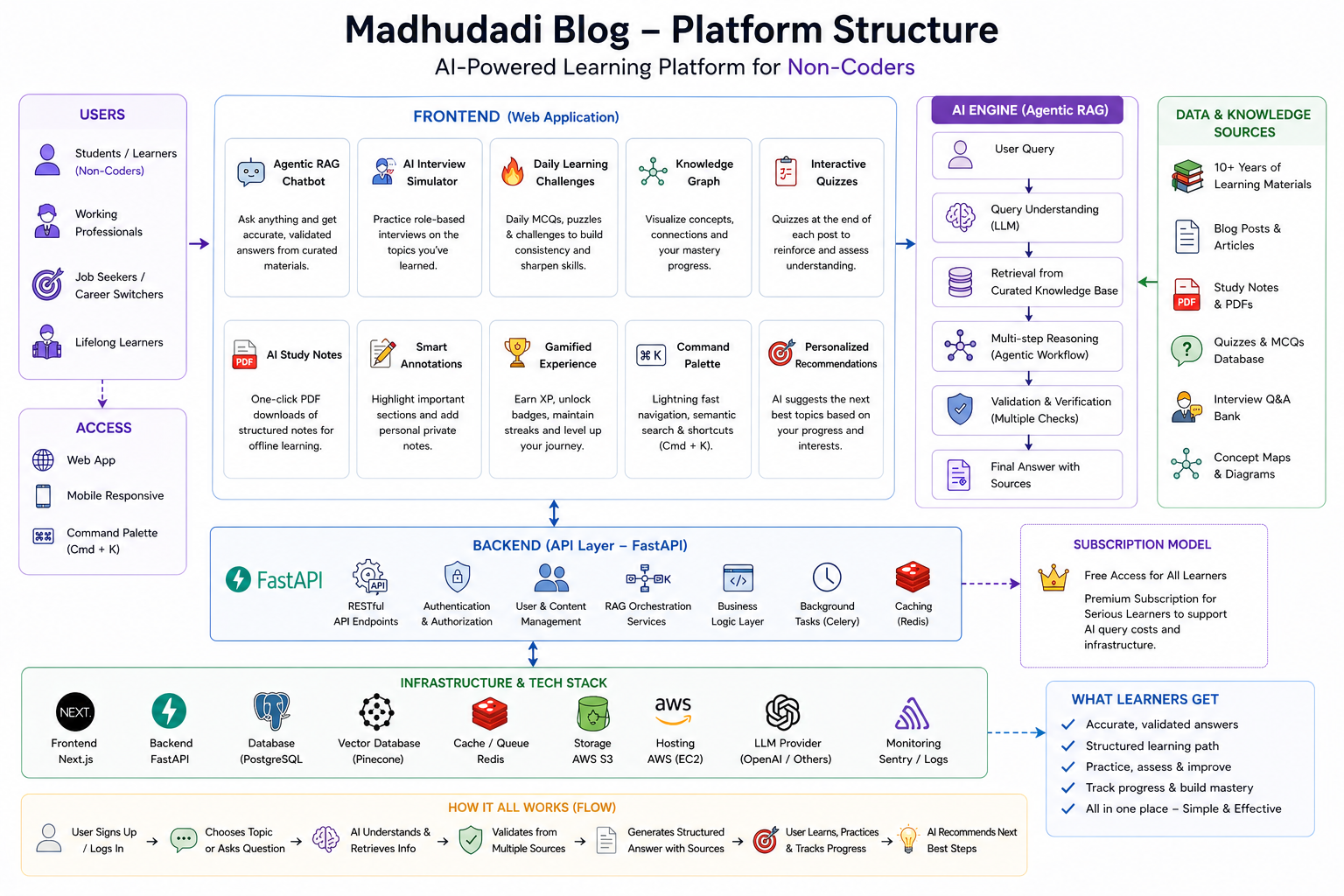
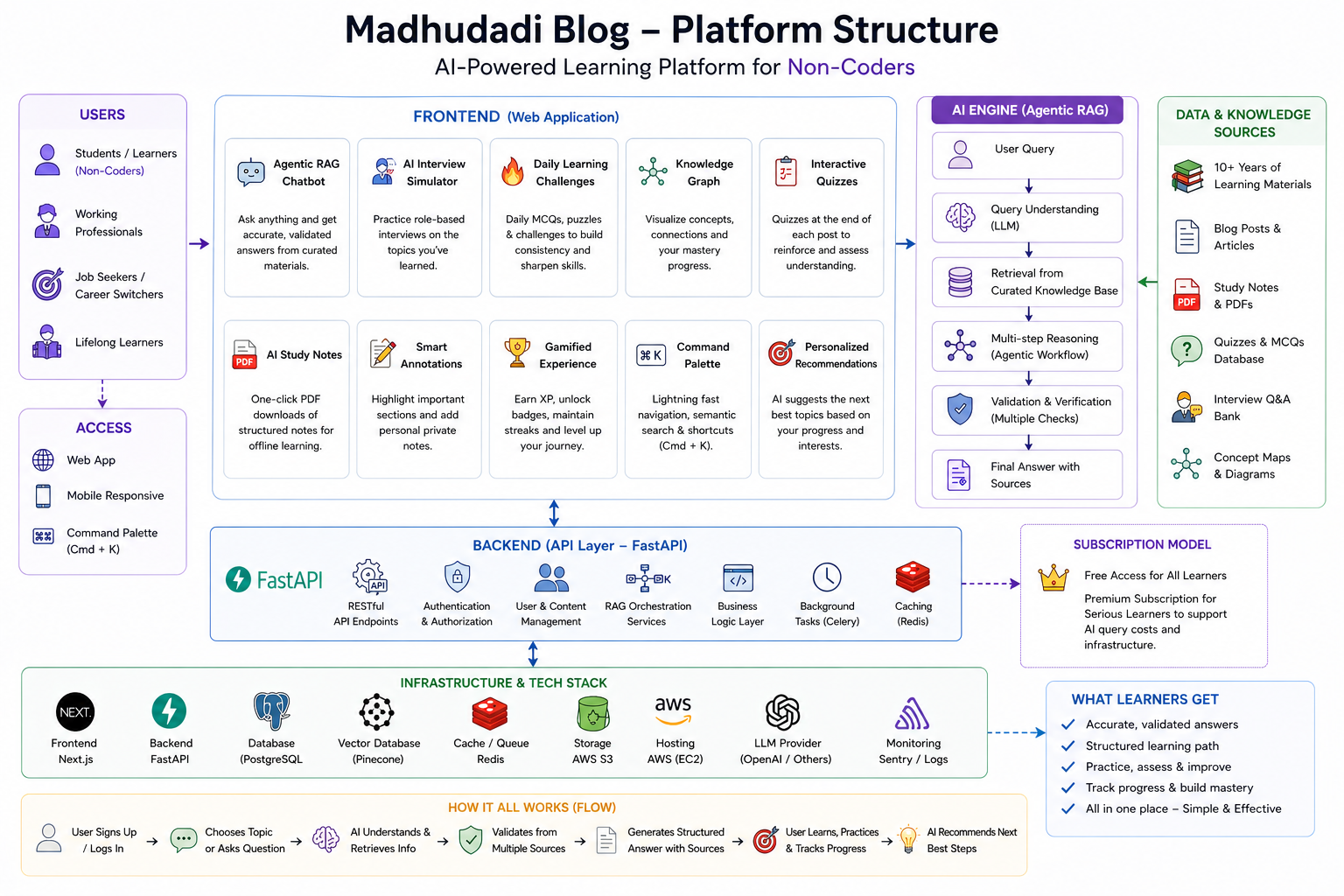
The platform runs on three layers:
Frontend — Next.js 16 (Turbopack)
- React 19 with App Router, server components, streaming SSR
- Tailwind CSS for styling, framer-motion for transitions
- Monaco editor, xterm terminal, D3.js knowledge graph in the browser
- All routes under
/blogsubdirectory (for clean reverse-proxy routing)
Backend — FastAPI (Python 3.12)
- 29 API routers, 21 database models, async SQLAlchemy
- PostgreSQL for persistence, Redis for caching + rate limiting + pub/sub
- Background scheduler for digest emails, content revalidation, maintenance tasks
- JWT-based auth with Google OAuth + email/password fallback
Infrastructure — Docker Compose
- Four services: backend, frontend, PostgreSQL, Redis
- Nginx reverse proxy with caching, brotli compression, security headers
- Cloudflare for DNS, DDoS protection, edge caching
- Single
docker-compose.yml, zero external dependencies
The full stack runs on a $12/month VPS. No Kubernetes. No serverless. No vendor lock-in.
Key Design Decisions
1. FastAPI Over Django or Node.js
I chose FastAPI for three reasons:
- Async-first — every database call, Redis operation, and LLM request is non-blocking
- Pydantic schemas — request validation and response serialization are declarative, with automatic OpenAPI docs
- Python ecosystem — the ML/AI tooling (sentence-transformers, PyTorch, spaCy) is Python-native. Running a separate Python AI service would have negated the simplicity of a monorepo
Was Django an option? Yes. But Django's ORM, while powerful, is synchronous by default. The async story in Django 5.x is still catching up. For a stack that makes 4-6 async I/O calls per page load, FastAPI's native async support eliminated an entire class of performance problems.
2. Next.js 16 Over a Static Site
Next.js was chosen for:
- Server components — expensive data fetches (database queries, API calls) run on the server, only HTML ships to the client
- Dynamic OG images — the
/api/ogendpoint generates share cards per-post without a separate service - ISR (Incremental Static Regeneration) — popular posts are cached as static HTML, revalidated on publish
- Middleware — auth checks, redirects, and A/B tests run at the edge without touching the backend
The trade-off: Next.js is opinionated about file-based routing. The app/blog/[slug]/page.tsx convention means posts live at /blog/posts/{slug}. But the flexibility of having metadata generation (generateMetadata), static params (generateStaticParams), and server components in one file outweighs the routing quirk.
3. PostgreSQL Over a Document Store
Every post, user, comment, badge, and payment lives in a single PostgreSQL 16 database. Why not MongoDB?
- Relations — the data is deeply relational. Users have progress on posts. Posts belong to series. Badges have criteria that reference multiple tables. SQL joins handle this naturally
- JSON columns — for semi-structured data (user settings, post metadata), PostgreSQL's JSONB gives document-store flexibility with relational integrity
- Full-text search —
tsvectorindexes power the hybrid search alongside pgvector embeddings. No need for Elasticsearch - pgvector — embedding storage and similarity search live in the same database as the content. One connection pool, one backup strategy
The architecture uses one primary database with Redis as a cache layer, not a secondary database.
4. Redis as the Glue
Redis does five things in this stack:
- Session cache — OAuth state tokens, rate limit counters, email verification codes
- Task queue — background jobs (email digests, content revalidation) via Redis pub/sub
- Embedding cache — frequently queried post embeddings are cached to avoid recomputation
- Rate limiting — slowapi backed by Redis for distributed rate limits across multiple workers
- Leaderboard — sorted sets for real-time XP rankings without hitting PostgreSQL
Having one well-understood cache layer for all five concerns simplified operations. Redis rarely needs tuning, and when it does, INFO STATS + MEMORY DOCTOR usually points to the fix.
What This Series Covers
This is post 1 of 15. Here's what's coming:
Foundation: Why I built it (this post), the monorepo structure, deployment architecture
AI Features: RAG chat from zero, production streaming, AI summaries, GEO optimization for AI crawlers
User Systems: Gamification engine, spaced repetition algorithm, premium paywall with Stripe
Interactive Features: Browser-based Python execution (WebContainer), AI-powered interview simulator, knowledge graph from reading history
Infrastructure: Docker stack retrospective, SEO that works for dev blogs, honest build retrospective
Each post will include code excerpts, schema snippets, and the actual implementation decisions. No fluff, no "download my ebook," no paywalled content.
The Honest Trade-offs
Building from scratch gave me full control. It also gave me full responsibility.
What I gained:
- Every feature integrates at the database level, not through API glue
- No platform dependency — Medium could pivot to AI-generated content tomorrow, and it wouldn't affect this site
- Full ownership of the SEO output — every
<meta>tag, structured data block, and robots.txt directive is hand-tuned
What it cost:
- Six months of evenings and weekends before the first post went live
- Ongoing maintenance:
npm audit,pip-audit, PostgreSQL updates, TLS certificate renewal - No built-in audience — Medium and Dev.to have discovery algorithms; self-hosted blogs have Google and word of mouth
Was it worth it? Every time a reader runs a Python snippet in the browser and sees the output render live, or asks the RAG chat a question and gets a source-cited answer, I know the answer is yes.
What's Next
Post 2: The Monorepo That Runs 29 Services →
In the next post, I'll walk through every directory in the monorepo, explain what each of the 29 API routers does, and show the database schema that ties it all together.
Built with FastAPI, Next.js 16, PostgreSQL, Redis, and zero third-party CMS. Deployed on a $12/month VPS.
Next in this series: The Monorepo That Runs 29 Services →